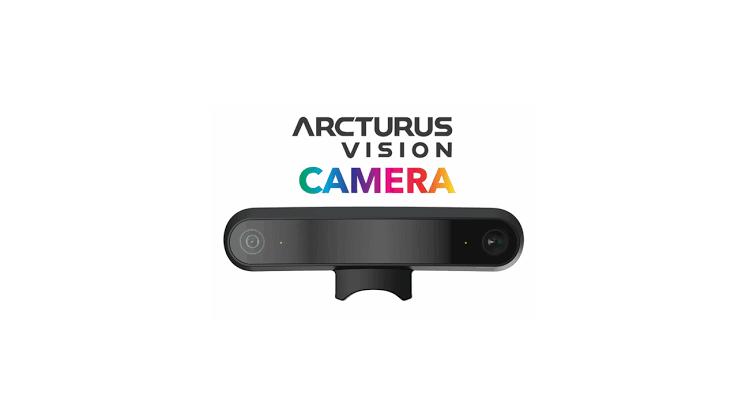

Arcturus Vision supplied Steam Frame Hub with the Vision Camera used for this review. Arcturus Vision had no editorial control over this article, did not review it before publication, and has had no input into our conclusions.
I’ve now spent over a day using the Arcturus Vision Camera with Steam Frame, and there’s really no subtle way of putting it: the difference compared with the headset’s stock passthrough is night and day.
Steam Frame’s built-in IR cameras do their job. They’re perfectly functional for quickly checking your surroundings without taking off the headset, and their IR capabilities have some advantages of their own. But switching to the Arcturus Vision Camera transforms passthrough from something I tolerate when I need it into something I actually want to use. For mixed reality in particular, it makes Steam Frame feel truly like next generation VR.
Good Things in Small Packages
One of my biggest concerns before receiving the Vision Camera was whether adding another piece of hardware to the front of Steam Frame would compromise what I like about the headset’s design. I’m pleased to confirm that it doesn’t. The camera connects seamlessly to Steam Frame’s expansion port on the bottom of the headset and essentially works straight out of the box with no awkward setup process.
More importantly, it looks like it belongs there. The camera sits almost flush with the headset curvature and weighs less than 10 grams. In use, I’ve honestly found the additional weight imperceptible. It’s small, slick and feels much more like part of the Steam Frame than an accessory bolted onto the front.
I’ve also tried it alongside the other Steam Frame accessories I currently have access to and haven’t encountered any compatibility issues so far.
Passable to Paramount
The biggest upgrade is obviously colour. Steam Frame’s stock cameras provide monochrome passthrough, while the Vision Camera gives you full-colour HDR passthrough. On paper that’s an obvious improvement. Inside the headset, though, the difference is much more significant than those words suggest.
Colours are vibrant and surprisingly lifelike, and the real world immediately feels more natural through the headset. Image warping also appears noticeably improved compared with the stock cameras. There’s still the inherent feeling of looking at the world through cameras rather than your own eyes, but objects and the environment feel considerably more stable to me.
The easiest example of the difference is my phone. With Steam Frame’s stock cameras, I’ve regularly found myself lifting or removing the headset when I need to respond to a message. With the Vision Camera, I can pull my iPhone out, read the display and respond to messages without taking the headset off at all.
That might sound like a minor convenience, but it’s been one of the biggest QOL improvements for my particular use case. Being able to remain inside Steam Frame while still properly interacting with the world around me removes one of those little pieces of friction that constantly reminds you you’re wearing a VR headset.
I even conducted the highly scientific test of walking to my fridge, grabbing a drink and returning without taking the headset off. Nothing was dropped soo.. we’ll call that a pass.
Dim the Lights
The Vision Camera doesn’t completely replace every advantage of Steam Frame’s stock infrared cameras. Most noticeably, you’re losing IR vision.
One of the surprisingly cool characteristics of the stock cameras is the way tracked controllers can appear almost transparent under infrared passthrough. You don’t get that effect through the RGB cameras. Likewise, Vision needs light. I tested it during daylight, under normal indoor lighting, in dimmer conditions and in darkness. As you’d expect from an RGB camera system, the experience deteriorates as available light disappears, whereas Steam Frame’s infrared system can continue to provide useful imagery in conditions where Vision can’t.
Personally, I don’t consider that a major drawback. If I’m sitting in a dark room, I probably don’t have much reason to be looking at my physical environment.. Passthrough is most useful to me in situations where there’s already enough ambient light for the Vision Camera to work. Under normal lighting conditions, I’d take the enormous improvement in image quality and colour every time.
Mixed Reality Wins
If you enjoy mixed reality, this is where the Vision Camera starts making an extremely compelling case for itself.
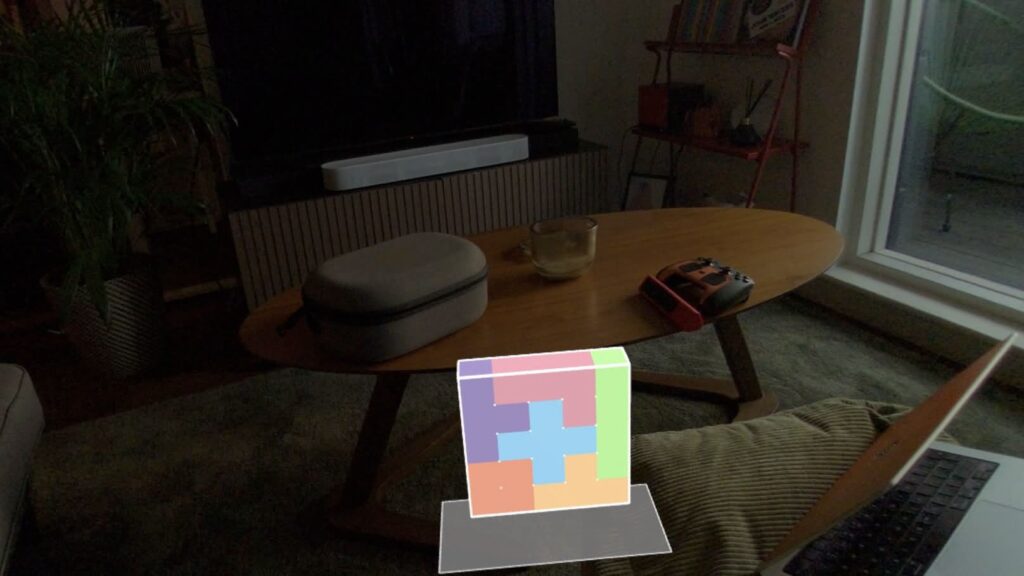
I tested it with Cubism, and the improvement is transformative. Instead of colourful virtual objects being placed over a grainy monochrome representation of your room, they exist within a full-colour view of your actual environment. It’s a much more cohesive experience and makes mixed reality feel less like VR with the background removed. I’ve never had more fun block building from my sofa. The game runs great on frame standalone too with a buttery smooth 90hz mode out of the box.
The improved clarity also makes your physical surroundings considerably easier to interact with. There’s another use case here that I think will be particularly relevant to Steam Frame owners: playing traditional games or watching content on virtual displays.
The Frame is already unusually well suited to throwing a huge virtual screen into your room and playing your Steam library. If you’re someone who enjoys doing that while remaining aware of your surroundings rather than sitting inside a completely virtual environment, well, the Vision Camera makes the experience way more appetising…
Spatial Video… is good?
I initially thought of spatial video recording as a nice extra attached to the main attraction of colour passthrough. Having actually used it, I think I underestimated it.
Arcturus’ free Vision Camera app allows you to record and watch your own spatial videos directly on Steam Frame, with recording available at up to 5K HDR. The app also includes a collection of demonstration spatial videos. I ended up spending far longer watching those than I’d expected.
The sense of depth is convincing, and good spatial footage can have that strange quality where you stop thinking about the technology and simply find yourself looking around the scene. Recording is straightforward, and one thing that particularly surprised me was how quickly my recordings were ready to view. There’s very little friction between capturing something and being able to experience it again spatially.
I’d love to have some way of uploading spatial recordings and browsing videos captured by other Vision Camera owners directly inside the app. A community library of places, events and interesting moments recorded spatially could turn the application into something much bigger than a companion utility. The hardware makes me want to see what other people capture with it, which is probably one of the best compliments I can give the feature.
Latency, or lack thereof
I haven’t experienced any meaningful latency that has distracted me during normal passthrough or mixed-reality use. Moving around my apartment feels responsive and natural enough that I haven’t found myself consciously compensating for the cameras. I’ve also encountered no significant software or compatibility problems during my testing so far.
There is one area however that I’m deliberately not making a judgement on yet.. battery life.
I’ve only had the hardware for a little over a day, which isn’t enough time to reliably quantify how much additional power the camera consumes during extended use. That’s something we’ll continue testing.
Final thoughts, for now
The Vision Camera won’t, and shouldn’t, suddenly become essential for every Steam Frame owner. If you spend virtually all your time in fully immersive VR games and only activate passthrough for a few seconds to check where you’ve left a controller, Steam Frame’s built-in cameras already accomplish that. But if you regularly use mixed reality, spend time in passthrough, play traditional games on a floating virtual display, use your headset while other things are happening around you, or are interested in spatial video, the equation changes considerably.
Priced at £129 in the UK, you’ve got to really want that upgrade to justify the cost on top of the already pricey headset. But there’s another way of looking at that, if you’re already prepared to spend £1059 on Steam Frame 1TB and you’re the kind of user who actually benefits from passthrough, I’d seriously consider finding the extra cash.
There are trade offs. You lose the stock cameras’ infrared capabilities, and Vision naturally needs reasonable ambient lighting to deliver its best image. But none of those points have changed my overall experience so far. For someone who primarily enjoys relaxing watching video in passthrough mode, this is an optional but indulgent luxury that I’m very glad I have.